
Writing an email should be straightforward. On my Mac, it can feel like a memory test. Before I can dictate a word, I have to remember precise Voice Control commands to open Mail, start a message, choose a recipient and reach the message body. Then an ordinary word can open a menu instead of appearing in my sentence. Dictation stops and I lose my train of thought. Putting things right can require physical actions that are extremely difficult for me. All I wanted to do was send an email.
Nearly two months after Apple released macOS 27 Golden Gate and iOS 27 on 14 September, these frustrations remain familiar. Voice Control enables me to operate my Mac and iPhone independently, and its navigation can work extremely well. But writing with it is still far more difficult than it should be.
At the same time, another Apple technology has given me reason to rethink what hands-free computing might look like. My recent testing of Siri AI suggests that a more conversational approach to everyday tasks may be possible, although I have also encountered serious limitations.
Three years of asking for better voice technology
In August 2023, I wrote in The Register about the shortcomings of Apple’s speech recognition. I questioned why people who depended on Voice Control for navigating their devices had to accept such unreliable dictation, particularly with names, punctuation and everyday words.
In a follow-up article for Aestumanda in March 2024, I argued that AI could help Voice Control understand context, learn from corrections and recognise speech more accurately.
I have also repeatedly questioned why Apple offers different dictation experiences. Standard dictation has been improving, but when I switch on Voice Control to operate my computer without a keyboard or mouse, I cannot use standard macOS Dictation. I have to use Voice Control’s own dictation instead. Apple may share technology between these systems, but the difference in what people can actually use is clear.
More than three years later, many of my original complaints still stand.
When ordinary words become commands
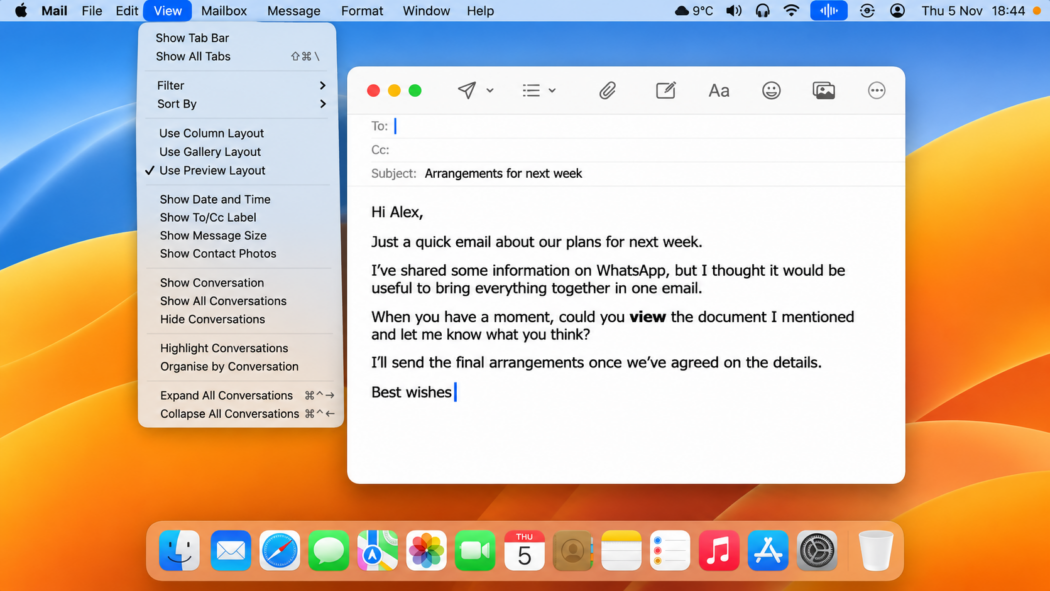
If I dictate “WhatsApp”, Voice Control may open WhatsApp from the Dock. If I say “view”, it may open the View menu in the top menu bar, exactly when I am trying to type the word into a sentence. If I say “send”, it can activate an onscreen button.
I am not asking the Mac to do any of those things. I am trying to write about them.
Once dictation is interrupted, I may have to find the right window again, return to the text field and restore the cursor before I can continue. Sometimes the only practical way to recover involves physical interaction with the computer, something I find extremely difficult because of my muscular dystrophy.
That uncertainty changes how I write. Instead of concentrating on a sentence, I find myself wondering whether the next word might be interpreted as a command. It is a constant, unnecessary mental burden.
The same problem can occur on iOS, although the Mac’s menus, windows and applications make it particularly disruptive there.
Dictation mode should mean dictation
Voice Control has Dictation, Command and Spelling modes. Command mode listens for instructions to operate the computer without typing ordinary speech. Yet Dictation mode does not offer the equivalent protection for writing.
Apple’s documentation says that in Dictation mode, words that are not Voice Control commands are entered as text. So the computer is still listening for commands while I dictate.
That is the design I would most like Apple to change. If I select Dictation mode, I should be free to dictate any word without worrying that the computer will act on it. When I want to control the computer, I should switch deliberately to Command mode using a reliable spoken instruction.
This separation is hardly new. Dragon Professional for Windows has long offered dedicated Dictation, Commands and combined modes. Microsoft’s Voice Access also has a dictation-only mode.
Neither is perfect, but both recognise the value of allowing people to choose whether their speech is text or an instruction.
Accuracy is still a problem
Voice Control continues to make basic transcription mistakes. It confuses everyday words, struggles with names and sometimes produces unwanted capital letters or punctuation.
Its custom vocabulary can help, but I have encountered a familiar problem: a name I have saved, “Hugh”, can appear when I say the ordinary word “to”. Vocabulary entries sometimes arrive without a space after them, creating yet another correction.
I have not carried out a formal recognition test, but in my daily use of the latest macOS and iOS releases, Voice Control dictation is no better than before. Some days it feels worse.
That does not mean Apple’s speech recognition has stood still. Standard macOS Dictation now uses an on-device AI model on eligible Macs to improve spelling, punctuation and capitalisation.
Other reviewers, including Adam Engst at TidBITS, have found useful advances in Apple’s wider dictation tools while also documenting limitations with Voice Control.
But someone who depends on Voice Control for navigation cannot simply take advantage of standard Dictation while leaving Voice Control switched on. That divide has troubled me for years.
New navigation features, but not on the Mac
Apple has made one welcome change in iOS 27. With Apple Intelligence, Voice Control on compatible iPhones and iPads can recognise more natural descriptions of onscreen items. Instead of memorising a button’s exact label, people can refer to its appearance or position.
Apple calls this Flexible Item Names. Someone can now say something like “tap the blue button at the bottom” rather than remembering its precise name.
Reducing the need to remember exact commands is a sensible improvement, but Apple has not introduced the equivalent capability to Voice Control on the Mac. That is where I do much of my writing and where I most need help moving between windows, menus and fields.
Better navigation is welcome in its own right. It still does not solve the problem of dictation being interrupted by unwanted commands.
AI dictation apps are finding other answers
Specialist applications such as Aqua Voice and Wispr Flow generally give me more accurate, context-aware transcription than Voice Control. They handle hesitations, sentence structure and corrections more intelligently, although they have their own limitations.
They are also beginning to offer useful actions beyond dictation.
Aqua Voice’s Send It feature can submit a message when I finish by saying “send it”, where the application and settings support it. Aqua is designed to distinguish that instruction from a sentence such as “I’ll send it tomorrow”. Its Edit Mode can also revise selected text through spoken instructions.
Wispr Flow’s Command Mode supports spoken editing and drafting, while its hands-free dictation options are becoming more capable.
These are worthwhile developments, but neither application replaces the extensive system-wide navigation that Voice Control provides. Their desktop workflows can still depend on keyboard shortcuts, focused text fields or other methods of initiating actions.
These tools are improving what happens once I am ready to write. What I have wanted for much longer is a way to handle the entire task, from opening the right application to sending the finished message.
Siri is starting to show another way
Over the past couple of months, I have been testing Apple’s new Siri AI on my Mac. One example stood out. I simply asked, “Can you help me draft an email?”
Siri opened Mail and started a new message. It asked who I wanted to contact, accepted a name from my contacts, added a subject and asked what I wanted to say. I dictated the message, and Siri asked whether I wanted to send it.
There were recognition mistakes, but I discovered that I could correct the dictated text by speaking to Siri. I did not need to reach for the keyboard.
What struck me was the difference in approach. Voice Control requires me to remember precise commands to open applications, select fields, navigate menus and move the cursor. Siri guided me through the task. I could explain what I wanted to do and answer its questions in ordinary language.
It was a much more natural way of working. But further testing, particularly with longer emails, has exposed some serious limitations.
Siri sometimes stops listening when I pause to think about what I want to say next. When I restart it, the assistant can struggle to find where I left off in the email. On occasions, resuming dictation has resulted in entire paragraphs disappearing from the draft.
Proofreading and editing are also unreliable. I have asked Siri to change the opening of a paragraph further down an email, only to discover that it has deleted a couple of paragraphs near the beginning. That is particularly frustrating when I have spent considerable time dictating and correcting the original text.
These problems make Siri difficult to trust with lengthy correspondence. Writing a considered email involves thinking, pausing, revising sentences and returning to something written earlier. I need to know that asking for one correction will not alter or remove something else.
For someone using a keyboard, recovering lost text or repairing an unwanted edit may be relatively straightforward. For me, it can be much more difficult. I also find myself checking whether Siri has changed anything I did not ask it to change.
My experience so far suggests that Siri works best with relatively short, straightforward emails. Its conversational approach is impressive, and being able to correct dictated text by voice is a significant improvement. But it remains unreliable when a task becomes more complicated.
Could Siri eventually replace Voice Control?
That experience raises a question I would not have asked so seriously a few years ago: will we eventually need Voice Control as a separate system?
For now, yes. Siri cannot yet be relied upon to provide Voice Control’s precise access to every menu, button, window and text field. Sometimes I want to give the computer a broad goal. At other times, I need to control an exact item on the screen. Any replacement must offer both.
Apple is exploring how those capabilities might work together. On 3 November, Apple announced a Siri AI developer preview designed to let more applications expose actions to Siri and combine several steps into a single request.
Other companies are developing AI agents that can go beyond answering questions and carry out several steps across applications, websites and connected services.
OpenAI’s ChatGPT Work is one example. Available to eligible users in the UK, including through its Mac application, it can accept spoken instructions and undertake more complicated work involving websites, files and connected applications.
Meta’s Muse takes a related approach. Described by Meta as a personal AI agent, it operates through a dedicated cloud computer and can carry out tasks across connected services. However, its initial rollout is limited to the United States, with no confirmed UK availability.
These tools should not be mistaken for completely hands-free computer control. Application compatibility, permissions, regional availability and the need to approve certain actions using onscreen controls can still present serious obstacles for disabled people.
Apple has an advantage here. It controls macOS and iOS, and already provides the accessibility infrastructure on which Voice Control depends.
I can imagine Siri eventually becoming the main voice interface for the Mac, with Voice Control’s detailed navigation available whenever I need it. That would not necessarily mean abandoning the underlying accessibility controls. It might mean no longer having to manage two separate approaches to operating a computer by voice.
It would be a serious mistake to retire Voice Control before Siri could reliably do everything it does today. People who depend on speech cannot be left without a dependable way to navigate their computers when an AI assistant fails, loses its place or misunderstands a request.
Apple still needs to fix what we use today
The possibilities for Siri do not excuse the problems with Voice Control. Apple should improve recognition accuracy, make vocabulary more dependable and introduce a true dictation-only mode. It should also ensure that mistakes can be corrected and tasks resumed without physical intervention.
Reliability cannot be treated as an afterthought. In April, I reported that Apple finally fixed the “new line” and “new paragraph” commands after problems that had lasted seven months. Those are basic tools for someone writing by voice.
For more than three years, I have argued that Apple should bring greater intelligence to speech recognition and voice control. My recent experience with Siri gives me reason for optimism, but also demonstrates how much work remains.
Being able to draft and correct an email through conversation is welcome. Being able to trust that Siri will preserve the text I have already written is equally important.
Voice Control is still on my Mac, and I still depend on it. Until Siri can offer equally comprehensive and reliable control, Apple has a responsibility to improve both.
When I want to send an email, I want to think about what I am saying, not about which command I need next or whether the next word will open a menu. That is the standard against which I will judge whatever Apple builds next.