
A new, free voice dictation application for Linux has launched with a focus on privacy and local speech recognition, although its developer acknowledges that people who depend entirely on voice input will find important features missing.
Quoth, released on 24 November, lets people dictate into documents, messages and other desktop applications without sending their speech to an online transcription service. Once its speech recognition model has been downloaded, the software works offline.
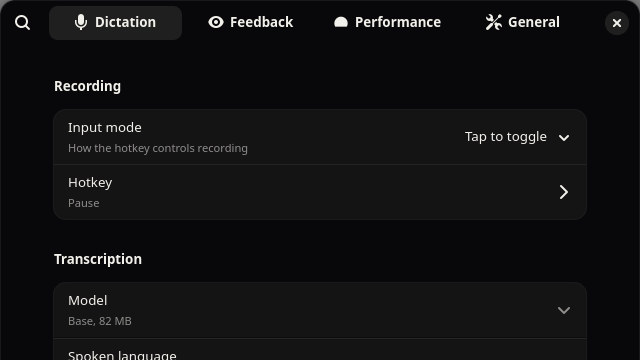
Developed by Samuel Ruairí Bullard, Quoth 0.1.0 uses the open-source Whisper speech recognition system. People can press a keyboard key to begin dictation, then press it again or release it to insert the recognised text into the application they are using.
The software offers four Whisper models, with different requirements for processing power and accuracy. It can use a computer’s CPU, a compatible graphics processor or an Intel neural processing unit (NPU), benchmarking the available hardware to select the fastest option for each model.
Quoth is available for 64-bit x86 Linux computers running the Wayland display system, with installation options for Ubuntu, Pop!_OS, Flatpak and Arch Linux. It is released under the GPL-3.0-or-later open-source licence.
Accessibility remains a work in progress
In correspondence with Aestumanda, Bullard acknowledged that the first release is designed for dictation rather than complete voice control.
“This first version is dictation, not voice control: there’s no voice activation and no spoken corrections yet,” he said. “Both are on the roadmap, but I don’t want to promise a date.”
That distinction is important for disabled people who cannot use a keyboard. A dictation application may recognise speech accurately, but it is of limited independent use if someone needs physical assistance to activate it or correct mistakes.
As Aestumanda has previously reported in its coverage of Apple Voice Control, reliable dictation is only part of the challenge. People who depend on voice access also need to navigate applications, edit text and recover from mistakes without physical intervention.
Quoth does provide an alternative to pressing its designated keyboard key. Its command-line interface and D-Bus integration allow other applications and accessibility tools to start and stop recording.
“What you can do today is start and stop dictation from another accessibility tool,” Bullard explained, suggesting that a switch or foot pedal could be used.
However, he added: “I haven’t tested a complete hands-free setup myself yet.”
Spoken punctuation commands are also absent. Punctuation and capitalisation depend on the Whisper model, and there is currently no dedicated British English setting.
Bullard has also identified speech recognition for people with atypical speech as an area requiring further development.
“One gap I already know about is atypical speech, which Quoth doesn’t handle today,” he said.
He has begun discussions with speech accessibility company Voiceitt about possible support, but stressed that no such functionality is available in Quoth yet.
Bullard said he had not yet received feedback from disabled people who rely on speech input and would welcome their experience.
Early testing shows promise and limitations
An independent hands-on review by Abhishek Prakash at It’s FOSS, published on 26 November, found that Quoth generally worked well for dictating into a text editor, chat applications and AI prompts on an Ubuntu laptop.
Prakash found that the larger Turbo speech model produced more accurate results than the default Base model in his tests, particularly when recognising unfamiliar names and handling hesitations.
His testing also exposed problems. The application did not accept combinations of keys for its recording shortcut, some menu options failed to open, and a floating recording indicator was unavailable on his GNOME desktop.
These findings illustrate some of the limitations of the early release, although they do not establish how Quoth performs across every supported Linux configuration.
Quoth 0.1.0 is available from the official website, with its source code published on GitHub.
My view
The arrival of another free, open-source dictation application is always welcome, particularly one that processes speech locally rather than sending it to the cloud.
As someone who depends heavily on voice technology, however, I cannot overlook Quoth’s current limitations. Without built-in voice activation or spoken corrections, it is not yet a practical independent option for people like me who need to operate their computers entirely by voice.
I use Macs and Windows PCs rather than Linux, so I haven’t had the opportunity to try Quoth myself. My assessment is based on the developer’s detailed responses to my questions, the published documentation and the independent testing carried out by It’s FOSS. I cannot personally judge its transcription accuracy, speed or reliability.
What encourages me is that Bullard recognises these shortcomings and has put improvements on his development roadmap. I am also pleased to see his awareness of the difficulties people with atypical speech face, an area that remains poorly served by mainstream speech recognition technology.
Quoth is still at an early stage. I hope its developer can turn that awareness into practical improvements, ideally informed by testing with disabled people who depend on speech input.