
Taking a screenshot on an iPhone with Voice Control could hardly be simpler.
Say “Take screenshot” and it happens.
Starting a screen recording is very different. There is no equivalent direct Voice Control command. Siri cannot start one either, and Screen Recording is not available as an action in Shortcuts.
For people with severe upper-limb disabilities, that leaves a surprisingly complicated route to a standard iPhone feature.
A simple task that still depends on touch
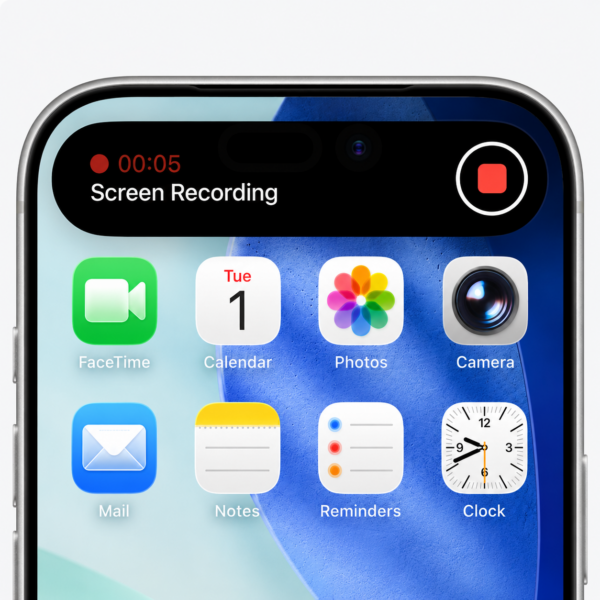
Apple’s official instructions for starting a screen recording require you to open Control Centre, select the Screen Recording button and wait for the three-second countdown.
Apple Support: Record the screen on your iPhone
On an iPhone with Face ID, opening Control Centre conventionally means swiping down from the top-right corner of the display.
For someone with very limited upper-limb mobility, that can be one of the most physically challenging gestures on an iPhone. For some disabled people it may simply be impossible without assistance.
Voice Control provides a workaround, but it is far from straightforward.
You need to use Voice Control to open Control Centre. If Screen Recording is not immediately visible, you may then need to navigate to the appropriate group of controls. You may need commands such as “Show Names” or “Show Numbers” to identify the correct control before finally activating it by voice.
Depending on how Control Centre is configured, what should be a simple action can therefore require several separate voice commands.
Compare that with taking a screenshot:
“Take screenshot.”
One command. Done.
Siri doesn’t solve the problem either
Siri should offer the obvious alternative, but it cannot start a screen recording.
Shortcuts does not solve the problem either, because Screen Recording is not exposed as an action that someone can place in a shortcut and trigger by voice.
The issue is not that screen recording is entirely inaccessible through Voice Control. With enough navigation and spoken commands, it may be possible to reach the control.
The problem is that an action which could reasonably require one spoken instruction instead demands a multi-stage journey through an interface designed primarily around touch.
What about Apple’s new Siri?
This becomes more striking in the context of Apple’s new generation of Siri.
Apple says Siri AI will understand personal context, recognise what is happening on screen and take actions in apps. The company presents it as a substantially more capable assistant that can act on a person’s behalf across services such as Messages, Music and Reminders.
That direction could be particularly valuable for disabled people who cannot reliably use a touchscreen. The more actions Siri can perform directly, the less someone has to navigate a visual interface step by step.
Yet Apple’s published information about the new Siri gives no indication that something as simple and useful as starting or stopping a screen recording will be included.
I am currently testing the iOS 27 beta. When I ask Siri to start a screen recording, it clearly tells me that it cannot do so and directs me to Control Centre instead.
That feels like a missed opportunity. A more capable Siri should not be judged only by ambitious AI features. Some of its most valuable improvements for disabled people could be simple commands that remove unnecessary physical interaction.
Screen recording is a good example.
Apple has already shown that it can be done
There is another reason this omission is frustrating: the capability has appeared on an iPhone before.
In 2023, independent testers demonstrated that iOS 16.5 beta 1 allowed Siri to start and stop screen recordings by voice. MacRumors reported that saying “Hey Siri, start a screen recording” would begin recording the display, while a second Siri request could stop it. 9to5Mac also demonstrated the feature during the beta period.
The capability then disappeared during the later iOS 16.5 beta cycle and did not reach the public release. I can find no evidence that Apple has restored it in any subsequent public version of iOS.
Apple never publicly promised that the iOS 16.5 beta feature would ship, so it would be wrong to describe this as a broken commitment. But its brief appearance demonstrated something important: a direct voice command for screen recording is technically possible.
Three years later, it is still missing.
Apple should bring it back, and go further
I would like Apple to introduce two very simple commands:
“Start screen recording.”
“Stop screen recording.”
They should be available natively through both Voice Control and Siri.
Apple should also expose Screen Recording as a Shortcuts action, giving people the freedom to incorporate it into their own accessible workflows.
This would not require inventing a new accessibility concept. Voice Control already provides the model.
If I can say “Take screenshot” and have my iPhone immediately capture what is on the display, I should be able to say “Start screen recording” and have it begin recording.
As Apple works to make Siri considerably more intelligent and capable, it should not overlook the value of simple actions like this.
Sometimes accessibility does not require a sophisticated new AI feature. It just requires removing several unnecessary steps between a person and something their iPhone can already do.