
I am probably still an iPhone person at heart, but I have kept a Google Pixel alongside my iPhone for the past three or four years.
This year, I came close to changing that.
I was seriously considering selling my Pixel 10 Pro and going back to using an iPhone alone. Then I watched Google demonstrate Rambler at the Pixel 11 launch.
As someone who depends heavily on voice input, it immediately caught my attention. Rambler was one of the main reasons I upgraded to the Pixel 11 Pro.
I have now been using it every day for a week, and I have not been disappointed.
It is not perfect, but it is the best mobile dictation system I have used so far.
Rambler understands the way people actually speak
Pixel voice typing was already very good. What Rambler changes is the way the system deals with natural speech.
Traditional dictation tries to transcribe what you say.
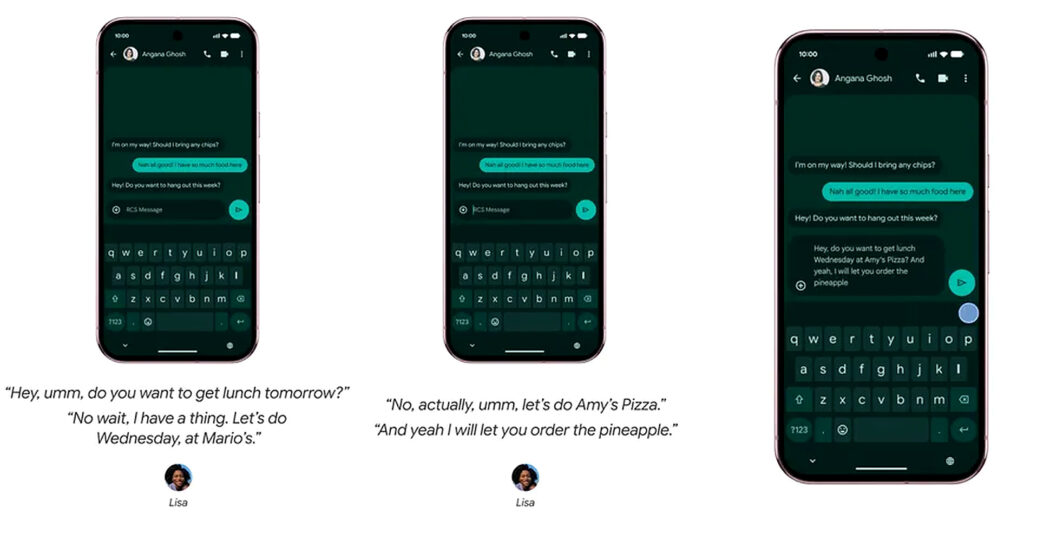
Rambler also tries to work out what you meant.
You can pause, hesitate, say “um” or “ah”, correct yourself halfway through a sentence or abandon one thought and start again. Gemini then cleans up the result and produces something much closer to finished written text.
That sounds simple, but in practice it makes a noticeable difference.
Human beings do not normally speak in polished paragraphs. We think as we talk. Older dictation systems often preserve every false start and change of mind.
Rambler is much better at discarding the bits that no longer matter.
That means I spend less time correcting the transcription afterwards.
My WhatsApp messages are probably the best test
The clearest example for me is something I do twice every day.
Each morning and evening I send a WhatsApp message to each of my parents, giving them a rundown of how things are going here.
These are not carefully prepared test sentences. I just talk through what has happened, in the same fairly conversational way I would if I were speaking to them.
With Rambler, those messages are coming out close to perfect almost every time.
Often I can read through the finished message and send it without changing anything. When corrections are needed, they are usually very small.
For me, that tells me far more than a polished launch demonstration.
It is a real task I do every day, and Rambler is making it easier.
It is also coping with my ventilation mask
I am using Rambler most of the time while wearing a nasal pillow ventilation mask.
That makes its accuracy even more impressive.
Speech recognition does not always get ideal conditions in everyday life, but Rambler is still picking me up extremely well and producing clean text.
That matters because accessibility technology has to work in the circumstances in which someone actually lives, not just in a quiet demo room.
So far, Rambler has.
It is better than the dictation I am getting on my iPhone
I use an iPhone extensively, and Apple has improved both Siri and Dictation.
But in my own experience, Rambler is a clear step ahead of dictating through Apple’s Voice Control and the newer Dictation experience I am currently testing in the iOS 27 public beta.
I have also been impressed by newer AI dictation tools such as Aqua Voice, which I reviewed last year. Rambler takes a similar idea onto the phone and builds it directly into Gboard.
The difference is not simply whether one system recognises an individual word and another does not.
Rambler is better at dealing with the untidy way I actually speak.
It understands hesitations, false starts and corrections, then turns them into something much closer to the text I wanted in the first place.
Apple’s Voice Control still has strengths elsewhere. It is very useful for controlling the interface, pressing buttons and moving around the device by voice.
But that exposes a problem I have written about before.
The best voice-control system is not necessarily the best dictation system.
For someone who relies heavily on voice, I should not have to choose between the two.
There is one thing I miss immediately
Rambler does not show the words appearing while you speak.
You talk, finish the Rambler session, and only then see the result.
I understand why Google has designed it this way. Rambler often needs the whole sentence before deciding what you actually meant.
If I say:
“I’ll see you Tuesday. Actually, make that Wednesday.”
there is little point displaying Tuesday as though it were final text.
Even so, I miss the live feedback.
When you depend heavily on voice input, seeing the words appear tells you that the microphone is hearing you and lets you spot a serious recognition error quickly.
I would like Google to find a way of offering provisional live text before Rambler produces the cleaned-up final version.
Some useful voice commands have also disappeared
This is my bigger criticism.
Standard Assistant voice typing on previous Pixels offered useful hands-free commands for editing and sending messages. You could dictate your text, say “send”, and the message would go without touching the screen.
With Rambler, that end-to-end voice workflow is gone. I have to finish the dictation and then physically tap the screen to send the message.
For most users, reaching out to tap the screen afterwards is barely an inconvenience. For anyone who relies on their phone being genuinely hands-free, it is a significant regression.
Google has made the language side much smarter, but in doing so has taken away some of the direct voice control that made the previous system useful.
I want both.
The good news is that Rambler can be switched off and standard Pixel voice typing restored.
But the better answer would be to bring the two systems together.
The editing is promising too
Rambler can also change text after it has been produced.
You can ask it to make something shorter, change the tone, replace wording or add an emoji.
I have also found the translation particularly useful. I can dictate a message in English, let Rambler put it into the text box, then activate Rambler again and simply say, “Make that Polish.” It automatically translates the text I have just dictated.
That is useful to me because I have a Polish carer. Instead of moving the text into a separate translation app, I can dictate it and translate it with one additional spoken instruction.
Rambler can also make use of words in my Gboard dictionary and has its own dictionary for words learned through voice typing. That could be particularly helpful with the sort of vocabulary speech recognition often struggles with, such as proper nouns, unusual names, pet names and foreign names.
This is where AI could make voice editing much easier.
Older speech systems often expect you to learn exact commands. Modern language models increasingly understand ordinary instructions.
I should be able to say:
“Change the second paragraph so it says Thursday.”
Or:
“Make that last sentence shorter.”
Or:
“Put that back the way it was.”
The language models already understand requests like these.
The next challenge is connecting that intelligence properly to the rest of the device.
Online and offline Rambler are different
Rambler can work offline, but not with all of its features.
Basic clean-up, punctuation and capitalisation remain available, while more advanced rewriting depends on an internet connection.
Google also says Rambler is subject to usage limits, although it has not been particularly clear about exactly where those limits sit.
That is something I want to keep an eye on.
If someone uses Rambler occasionally, a cloud limit may not matter much.
If voice input is central to how they communicate and work, it matters far more.
Google needs to be very clear about that.
The price of getting Rambler
There is one other drawback at the moment: access to Rambler effectively starts with the price of a new Pixel 11.
Google currently requires a Pixel 11-series device to use Rambler. In the UK, the Pixel 11 starts at £879, while the Pixel 11 Pro starts at £1,079.
That is a lot of money if Rambler is the feature that interests you most.
I bought the Pixel 11 Pro largely because I wanted to use Rambler, and after a week I am glad I did. But I hope Google does not keep such an important improvement to voice input tied to its newest phones indefinitely.
Pixel voice typing was already available on older models, so I would very much like to see Rambler come to at least some previous-generation Pixels in future.
A real step forward
There are things Google still needs to improve.
I want some form of live transcription.
I want the useful hands-free commands brought back.
I want clearer information about usage limits.
And ultimately I want Rambler’s dictation quality combined with full voice control of Android.
But none of that changes my overall view.
Rambler is a significant improvement.
For years, progress in speech recognition mostly meant getting a few more words right.
Rambler goes further.
It is starting to understand the difference between what I literally said and what I was trying to say.
After a week of using it in real life, that already feels like a significant step forward.