
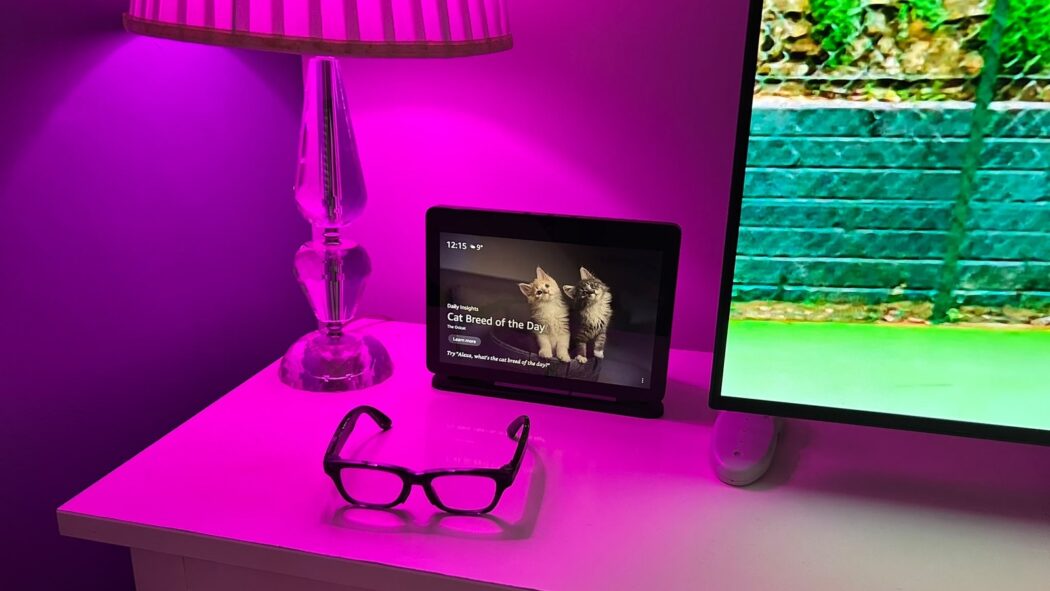
Meta glasses are already useful to me for calls, messages and photos without reaching for my phone. But there is something else I want from a device I wear throughout the day: a straightforward way to control my home.
I have filled part of that gap with Apple’s Shortcuts app. Disconnecting my glasses now triggers a bedtime routine that turns on my table lamp and bedroom TV. After checking the automation settings, I got it working without having to approve a notification on my phone.
In my setup, taking the glasses off disconnects them. That makes an everyday part of getting ready for bed a useful signal for the rest of the room. I have also built a morning routine around the opposite event: the glasses connecting to my iPhone. The two routines are designed to work within chosen hours and only once each day.
For someone with very limited arm and hand movement, that is a practical addition. I use a powered wheelchair and have muscular dystrophy. Every routine I can complete without handling a phone or remote removes another task that can be difficult for me.
The iPhone does the work
This uses Apple Shortcuts, often called Siri Shortcuts, but I do not need to speak to Siri to start it. The iPhone detects the glasses’ Bluetooth connection changing and runs the actions I have chosen. My existing smart home controls and shortcuts do the rest. The glasses supply the trigger; the phone runs the routine.
My morning setup responds to a connection between 10am and just before 12pm. It switches off an accessory I already control through Apple Home. The bedtime setup responds to a disconnection between 7pm and 10.00pm.
The evening sequence brings together several existing controls: closing the bedroom blind and turning on the table lamp, switching on the bedroom TV, turning off the heater, then dismissing the TV guide after a short pause. The blind and lamp are already linked in one shortcut. Another handles the TV guide. I could reuse these working pieces rather than rebuild every device control.
Apple supports Bluetooth automations that run without confirmation. Its documentation also explains how to allow shortcuts to run while the phone is locked. Those settings are central to what I want: a routine that works when the phone is out of reach, not one that waits for me to tap Yes.
Why the time and date checks are needed
A Bluetooth event on its own is not enough to express what I want. I might reconnect my glasses several times during a day. I do not want each connection to repeat the morning routine. Nor should every disconnection start preparing the bedroom.
The chosen hours narrow down when each routine can run. A saved date is intended to prevent another successful run on the same day. After the actions finish, the shortcut records the date, ready to check it next time. Apple’s built-in Shortcuts storage can retain information between runs, so this part of the setup does not need a separate storage app.
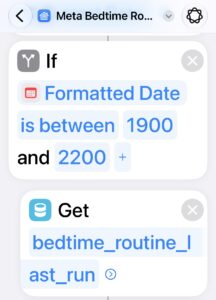
There is still a limit to what the trigger knows. In my setup, taking the glasses off produces the disconnection I need. But a disconnection is not proof that I am going to bed. A flat battery or a lost Bluetooth connection could produce the same event. The time window reduces that risk; it does not remove it. Anyone adapting the idea should choose actions they would be comfortable having triggered by an unexpected disconnection during those hours.
Getting it working took more effort than it should
Apple’s Describe a Shortcut feature in iOS 27 was a convenient starting point. On supported Apple Intelligence devices, it lets you explain in ordinary language what you want a shortcut to do, then creates the actions for you. Being able to describe my morning and bedtime routines in my own words made the process more approachable.
But the first attempt did not work as intended. I had to enlist ChatGPT to help troubleshoot it and get the routines working. That still meant checking date formats, conditions, stored values and permissions. ChatGPT’s guidance also needed checking against the screen; it was not a one-step repair.
Moving actions around the editor was also difficult. A system intended to reduce physical interaction still required plenty of it during setup.
Testing exposed some more ordinary problems. A routine restricted to evening hours did nothing when tested outside them. An unreachable heater interrupted a run because its smart plug had been unplugged from the wall.
Both the morning and evening routines now work well for me. Getting to that point took more troubleshooting than I expected, but I can now use the glasses’ connection and disconnection to start the routines without approving a notification on my phone.
Developers are exploring smart home control too
It would be too broad to say Meta glasses cannot control smart homes. Developers are already exploring ways to do it. Meta provides both a Wearables Device Access Toolkit for mobile apps and a Web Apps route for Meta Ray-Ban Display. These are distinct ways to build experiences for its glasses.
One example is Smart Glasses for Home Assistant, an open-source project by developer runningoec. It puts a small Home Assistant dashboard on Meta Ray-Ban Display, with controls that can call services for selected devices. Its instructions require a Home Assistant installation, a custom integration and setup through Meta’s developer features. It uses the Web Apps route, rather than being a built-in Meta AI smart home feature.
Separately, developer Sylvan Shen has demonstrated a proof of concept using the Device Access Toolkit and hand-gesture recognition to control Govee lights. That demonstration is described as using Ray-Ban Meta glasses; it should not be confused with the Display-specific Home Assistant project.
I have not tested either project. They show that developers are finding ways to connect these products, but they involve different equipment, software and ways of interacting. My own approach uses the Bluetooth connection from my first- and second-generation Ray-Ban Meta glasses. It requires no display app or Meta developer toolkit.
The gap I am addressing is the absence of straightforward, built-in smart home control in my own Meta glasses setup. Meta’s published guide to its voice assistant describes calling, messaging, photos, media and other functions, but does not list native smart home control.
Taking off my glasses can now start a room routine without a spoken command or a tap on my phone. Apple’s Describe a Shortcut feature is a welcome step forward, but I would like the company to make it easier to turn those descriptions into reliable, working routines. I would also like Meta to bring native smart home control to Ray-Ban Meta glasses, so I can ask Meta AI to control my lights, blinds, and other devices directly.