

This WhisperTyping review explores a high-accuracy Windows dictation tool built on OpenAI’s Whisper model, combining AI-driven rewriting, translation and workflow automation. While it requires a physical trigger, its ability to interpret intent and streamline messaging significantly outperforms native voice tools from Apple and Microsoft for users with limited mobility.
In 2024, I argued that no single dictation tool properly combined high accuracy with meaningful control of your computer.
At the time, my conclusion was clear: we had impressive AI transcription engines, and we had legacy voice control systems that offered computer navigation
WhisperTyping’s developer, Pieter Mekerle, read that piece.
He emailed me with a simple proposition. He believed he had built exactly what I said was missing.
WhisperTyping, a Windows-based dictation app he launched in 2024, combines high-accuracy AI transcription with lightweight computer control.
Since I already run Windows via Parallels on my MacBook Pro, he suggested it would slot directly into my workflow.
So I tested it.
For context, when I reviewed Aqua Voice, an AI-driven dictation app for the Mac, I described the difference between it and Apple’s built-in dictation as “night and day”. Modern AI-driven dictation clearly exists. Yet Apple and Microsoft are not deploying it effectively within their built-in voice tools.
After spending time with WhisperTyping, the conclusion feels similar — but with an important twist.
The setup: testing Windows AI on a Mac
WhisperTyping is currently Windows-only.
I am predominantly a Mac user. I tested it inside Windows 11 running in Parallels on my MacBook Pro. In that virtualised environment, it performed reliably and without noticeable friction.
It is not fully hands-free.
You must use a keyboard shortcut or assign a mouse button to start and stop recording dictation. There are no voice-only “wake up” or “go to sleep” commands that eliminate hardware interaction entirely.
For severely disabled people who cannot use hardware at all, that remains a limitation.
For those — like me — who can use parts of a keyboard or trackpad, even imperfectly, it has the potential to be transformative.
Disclosure: notes on this WhisperTyping review
After reading my previous commentary on voice technology, Pieter Mekerle provided access to the Professional tier of WhisperTyping so I could test it properly.
WhisperTyping was built in 2024 by Pieter — originally from Belgium and now based in Brazil — and is developed by a small distributed team of three, with collaborators in Belgium and Australia.
Accuracy: modern AI versus legacy plumbing
With the Professional tier enabled (including “Ultra Accuracy” mode), transcription accuracy is excellent.
Under the hood, WhisperTyping uses OpenAI’s Whisper speech recognition model for transcription, alongside large language models for its AI modes such as rewriting and translation. In other words, it is built on the same class of modern AI systems that power today’s leading language tools.
WhisperTyping supports more than 50 languages and handles natural speech comfortably. It prioritises linguistic context over rigid phonetic rules.
Compared with built-in Voice Control and Voice Access in Windows, the difference is immediate. Where platform tools often struggle with punctuation, proper nouns or context, WhisperTyping interprets intent intelligently.
That intelligence becomes especially apparent in how it handles pauses.
Like many disabled people with respiratory limitations, I cannot dictate long sentences in one breath. I naturally pause for two or three seconds between phrases in order to breathe.
With legacy systems such as Voice Control and Voice Access, those pauses are often interpreted as the end of a sentence. The software capitalises the next word, even though my sentence is not finished.
WhisperTyping does not treat short pauses as grammatical boundaries. I can dictate in shorter bursts, pause to breathe, and continue without the structure of the sentence being altered.
That flexibility may seem minor, but it makes dictation feel adaptive rather than rigid — and it illustrates the broader point: this is an AI-driven system interpreting intent, not merely reacting to silence.
In that sense, it sits closer to Aqua Voice than to built-in operating system dictation and, in some workflows — particularly messaging — I would argue it surpasses Aqua Voice in speed and efficiency.
Messaging: where WhisperTyping truly shines
WhisperTyping is particularly strong in messaging workflows.
In toggle mode, if you double-tap your assigned hotkey, the software:
1. Stops recording dictation
2. Inserts the text into a messaging text box
3. Automatically presses Enter
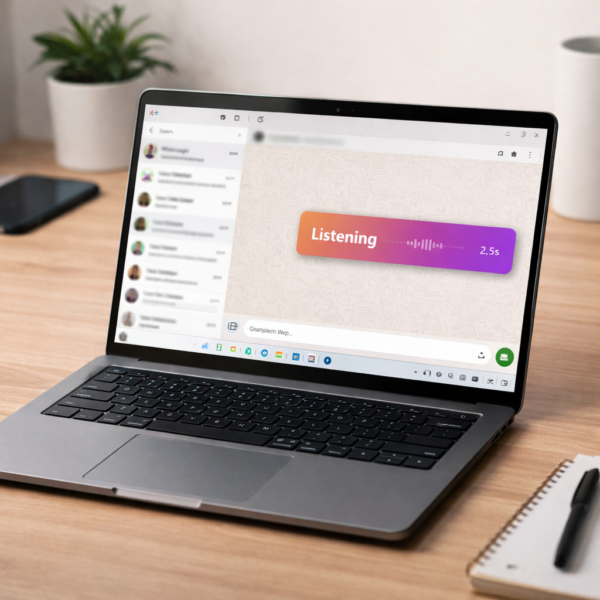
In WhatsApp, that means:
• Dictate your message
• Double-tap your hot key
• The text appears in the text box and sends instantly
It still requires a physical trigger. It is not voice-only.
But for high-volume messaging, this is extremely efficient. It removes friction and eliminates an extra confirmation step. The workflow feels deliberate and engineered for speed rather than layered on top of the operating system.
For a quick overview, WhisperTyping has published a short demonstration video below.
Translation: genuinely transformative
Where WhisperTyping moves beyond simple productivity and into genuinely enabling territory is its approach to translation. By prefixing a sentence with “write this in [Language],” the software transcribes English speech and outputs the target language in one fluid motion.
For my daily life, the impact is structural. I employ a Polish care worker whose English is limited; previously, communicating complex instructions via WhatsApp involved a disjointed dance of dictating in English, copying text, switching to a translation app, and pasting the result back into the chat.
WhisperTyping collapses this thirty-second ordeal into a three-second thought. There is no switching apps, no manual correction, and no “context switching” fatigue. By integrating translation directly into the dictation stream, it removes the invisible “disability tax” of extra steps. I have previously called on Apple to bridge this gap in macOS Voice Control; WhisperTyping proves that the technical hurdles are gone—all that’s missing from the platform giants is the will to implement it.
Replacements: fixing what built-in dictation still gets wrong
Text Replacements are another practical strength.
WhisperTyping allows you to define spoken aliases that automatically expand into structured text. You say a phrase once, and it is replaced instantly with whatever content you have assigned to it.
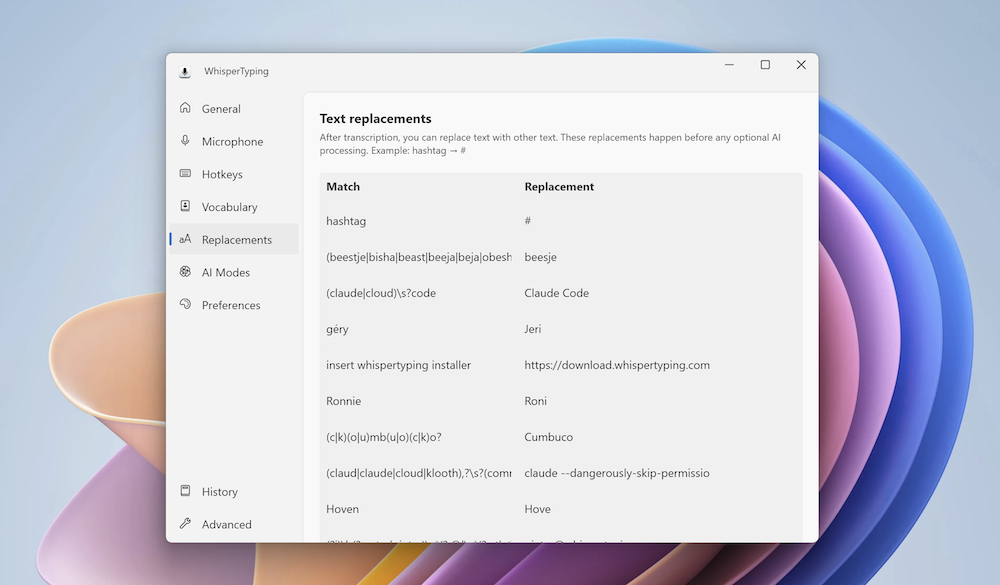
Built-in dictation systems, as well as tools such as Dragon and Aqua Voice, also offer text replacement in various forms. The difference here is the level of granular control. WhisperTyping gives you precise control over how each replacement behaves, which makes it more predictable in daily use.
You can create replacements for:
• Phone numbers
• Postal addresses
• Email signatures
• Frequently misheard proper nouns
Built-in dictation systems still struggle with names and structured data. WhisperTyping’s granular replacement controls provide reliable precision.
It is not glamorous. It is deeply useful.
Voice commands: beyond dictation into computer control
WhisperTyping does not stop at transcription. It also offers a measure of system-level control — something I argued in 2024 was missing from most modern AI dictation tools.
You can issue commands such as:
• “Open Paint”
• “Open Control Panel and go to sound settings”
• “Open booking.com and search for accommodation in New York”
The software recognises commands beginning with “open” or “run command” and launches applications or webpages accordingly.
This moves it beyond pure dictation and into lightweight system control.
Aqua Voice, impressive as it is for writing and editing, does not currently extend into this type of operating system interaction. WhisperTyping’s ability to both write and navigate gives it a broader footprint on Windows.
It is not a full replacement for Dragon’s deep interface control.
But it is more expansive than many modern AI dictation tools.
AI modes: write, rewrite and contextual commands
WhisperTyping does more than transcribe speech. It layers AI-powered writing modes on top of dictation.
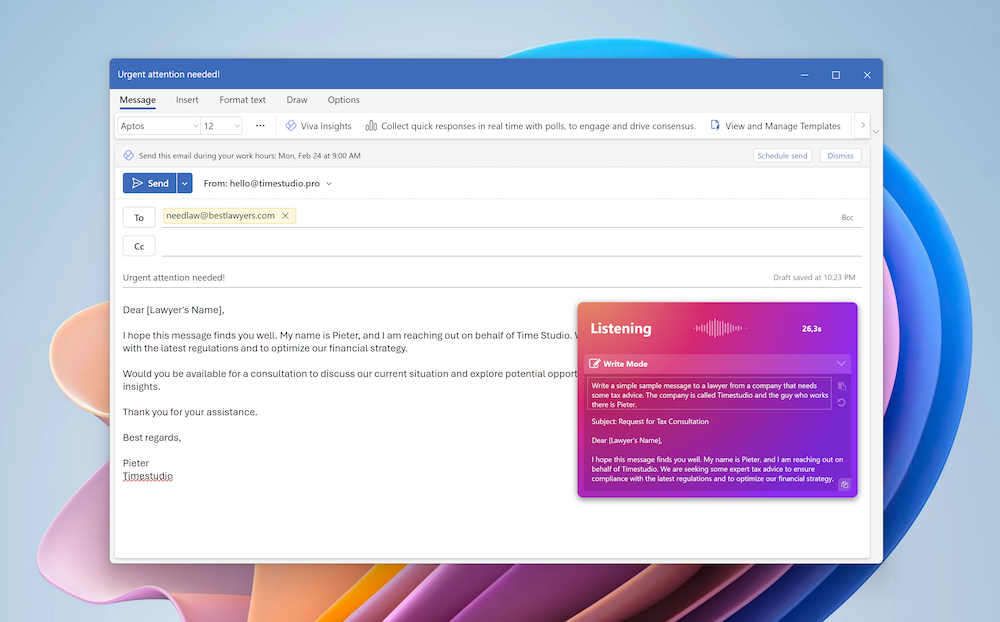
“Write Mode” allows you to draft conversationally. Rather than issuing precise cursor commands, you describe what you want in natural language:
“Write mode, tell my friend Mark I’ll be five minutes late — actually make it ten — don’t say traffic…”
The AI interprets evolving intent and produces a refined message.
There is also a powerful rewrite capability. If you begin with commands such as “rewrite this into bullet points” or “group this by department and add emojis”, WhisperTyping recognises the instruction and restructures the text accordingly.
It can answer questions based on clipboard content. You can select text, copy it, and begin with “answer” to generate a contextual response.
This represents a different philosophy from Dragon. Instead of command-by-command cursor control, it prioritises contextual intelligence and AI transformation.
For short-form communication, structured messages and quick reformatting, it is highly effective.
The “virtual paste” trade-off: compatibility vs. immediacy
Unlike legacy systems such as Dragon or Apple’s native Voice Control, WhisperTyping does not dictate directly into an active text box in real-time. Instead, it employs a universal “virtual paste” mechanism: you dictate into a floating bar, and once the transcription is finalised, the software inserts the text into your target field.
This design choice is a double-edged sword. The primary advantage is universal compatibility. Because WhisperTyping effectively “pastes” text, it bypasses the compatibility issues that often cause Dragon to fail in modern web-based apps or complex CRM software. It simply works everywhere.
However, the trade-off is the loss of live streaming. In apps like Aqua Voice, you see your words form on the screen as you speak. WhisperTyping stays silent until you finish, only revealing the text once the AI has processed the full context. Pieter Mekerle explained to me that his experiments with streaming slightly reduced overall accuracy; he prefers a finalised, correct sentence over a “jittery” live preview that might change mid-sentence.
While I respect the commitment to accuracy, the lack of a live preview can feel like flying blind. Seeing your words appear provides a psychological “safety net”—it allows you to adjust your cadence or catch an error before it’s committed. For a future iteration, I’ve suggested to Pieter that a “Streaming Preview” be added as an optional toggle for those of us who value immediate visual feedback as much as the final result.
Outlook and the limits of deep UI control
This “layer-on-top” approach also highlights WhisperTyping’s current limits regarding deep system navigation. I asked Pieter whether the software could eventually support in-app commands like “Click Reply” or “Send Email” in Outlook—the kind of “Command Mode” navigation that makes Dragon a powerhouse for hands-free office and email work.
The challenge is that modern versions of Outlook do not expose their user interface in a way that is easy for third-party tools to interact with programmatically. While WhisperTyping can launch apps and search websites, it doesn’t yet have the “eyes” to see and click individual buttons within complex software.
Pieter acknowledges this gap but argues the software wins elsewhere: it offers a fraction of Dragon’s cost, significantly higher raw accuracy, and AI modes that Dragon simply hasn’t prioritised. For now, WhisperTyping is a world-class writing and translation tool, even if it isn’t yet a total system pilot.
Recent features — and what’s next
One of the most recent additions is that Professional users can now use a mobile phone as a wireless microphone. That increases flexibility and may reduce reliance on fixed hardware setups.
More significantly for readers of this site, a Mac version is in development and expected within the next couple of months.
Given that I am predominantly a Mac user, the forthcoming Mac version will be an important moment.
If WhisperTyping’s accuracy and workflow strengths carry across intact, it could reshape the voice dictation landscape on macOS. And if it can operate alongside Apple’s Voice Control — using WhisperTyping for AI-level dictation while retaining Voice Control’s Command Mode navigation — the combination could be powerful.
That would effectively pair modern AI transcription with system-level voice navigation, something Apple itself has yet to fully integrate.
Privacy and cost
WhisperTyping processes speech in the cloud.
According to its privacy policy:
• Audio is processed in memory and not stored
• Transcripts are not retained by WhisperTyping
• AI mode content may be processed by third-party providers
This contrasts with fully on-device systems such as Apple Voice Control.
For some users, cloud processing will be acceptable. For others, it raises legitimate concerns.
Cost is also relevant.
The Professional tier I tested costs around US$15 per month (billed annually) and includes Ultra Accuracy mode, full AI writing features and unlimited transcription. There is also a lower-cost Personal tier at around US$5 per month, as well as a free tier with monthly limits.
By software standards, this is reasonable — particularly compared with legacy dictation tools.
But many disabled people live on limited incomes. Subscriptions accumulate. Paying extra for functionality that arguably should exist at platform level is not trivial.
The verdict: is WhisperTyping worth the subscription?
If you require a fully voice-only environment, WhisperTyping is not there yet.
If you can use a keyboard shortcut or mouse button, it is one of the most capable Windows dictation tools available today.
It offers:
• Excellent AI-level accuracy
• Real-time translation
• Powerful text replacements
• Intelligent contextual editing
• Voice-driven app launching
• Highly efficient messaging workflows
Compared with built-in Voice Control and Voice Access, the difference is stark.
Compared with Aqua Voice, it is at least competitive — and in messaging workflows, arguably faster.
For someone like me — a disabled person who can use parts of a keyboard with the help of a pencil — it is potentially a game changer.
A note on accessibility and direction
WhisperTyping’s website outlines a range of use cases, but it does not yet explicitly position itself as an accessibility tool. That feels like an opportunity.
Pieter has mentioned that he has heard from disabled users, and my own experience suggests the potential here is significant. As more hands-free voice features are added — particularly deeper in-app commands and voice-triggered send actions — WhisperTyping could become genuinely transformative for a wider group of disabled people.
There is a quiet accessibility story here. It may simply need telling.
A message for Apple and Microsoft
WhisperTyping demonstrates something important.
With modern AI, intelligent and flexible dictation is entirely achievable.
Apple and Microsoft have vastly greater resources. Yet their built-in systems continue to lag in translation integration and contextual intelligence.
Voice is not a novelty feature. For many disabled people, it is the gateway to work, education and connection.
In an era where “AI” is every CEO’s favourite buzzword, it is an indictment of the giants that a three-person team is delivering the actual revolution.
WhisperTyping shows what is possible.
Now the platforms need to match that ambition.